Meet Maya, your AI inspection assistant
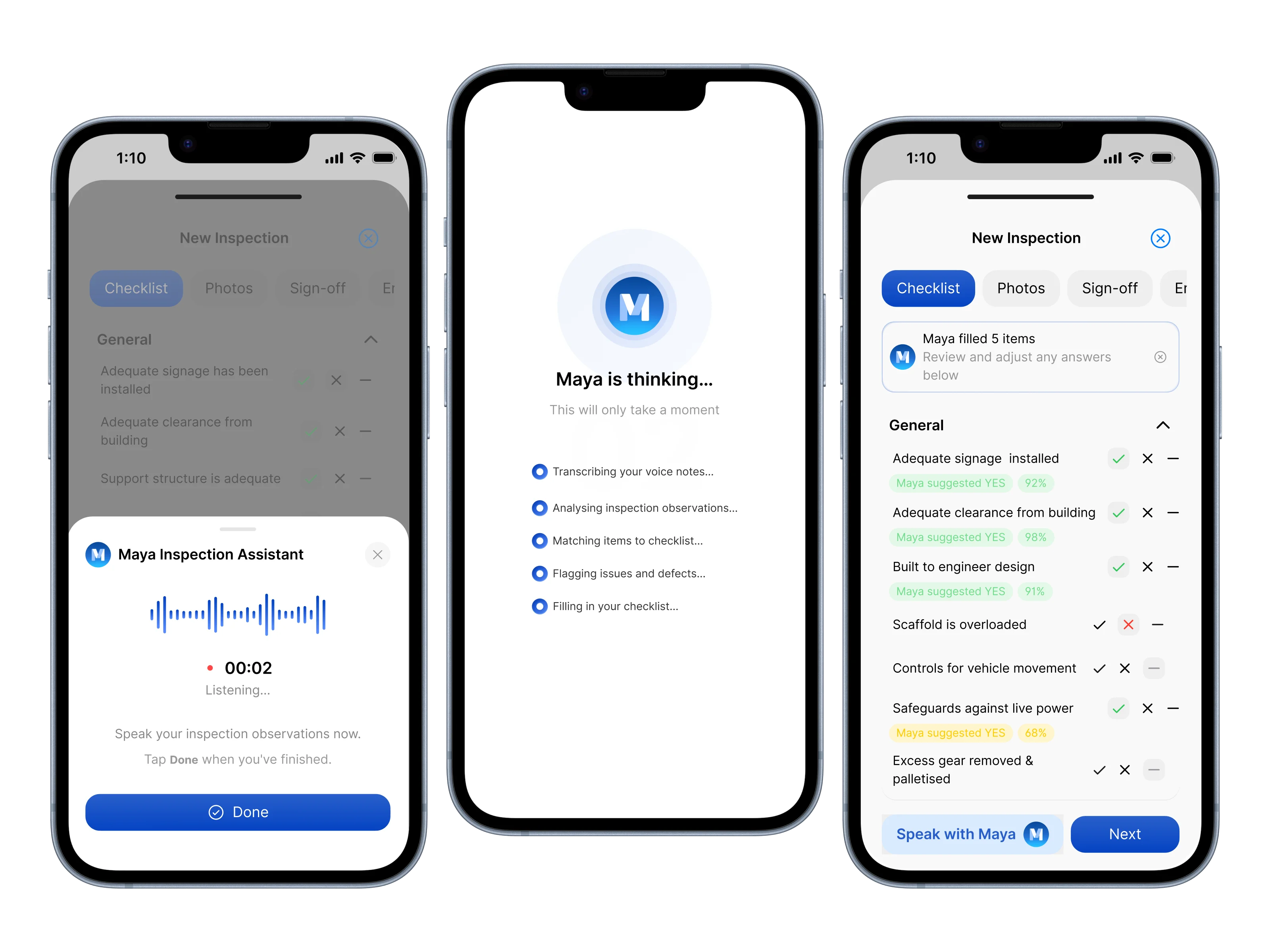
Speak your inspection notes, and Maya suggests the checklist answers for you to review.
An inspection is mostly walking the scaffold and looking. Recording it is mostly tapping: a YES, NO or N/A against every question on the checklist, one at a time.
Maya speeds up the second part. You can still tap through the checklist as you do today. Or you can describe what you've checked, and Maya suggests the answers for you to review.
Maya, Scafflinq's AI inspection assistant
How it works
Maya sits inside the inspection checklist in the mobile app.
- Open the inspection checklist and tap the Maya icon.
- Speak your observations. A short guide in the drawer reminds you what to cover.
- Maya transcribes the recording and maps it to the checklist you're using.
- Maya suggests YES, NO or N/A answers, and flags any issues you mentioned.
- You review each suggestion, then edit, accept or reject it.
- The accepted suggestions are applied to the inspection. Add your photos and sign-off and submit as you do today.
An example
Say this on site:
"Signage is in place, clearance from the building looks good, and the scaffold is within its rated load capacity. Access paths are clear, but there's a minor trip hazard near the east bay. Loading platform and mobile tower sections are not applicable."
Maya might suggest:
- Access paths are clear and safe for movement: NO, with the trip hazard near the east bay flagged
- Loading platforms: N/A
- Mobile towers: N/A
Nothing changes on the inspection until you apply it.
What to say
- Describe what you've checked using plain language
- Call out issues, defects or concerns clearly
- Mention any sections that are not applicable
Built on your checklist
Maya works from the exact checklist version used for the inspection, including your own custom groups and questions. Her suggestions only ever map to questions already on that checklist, and the only answers she suggests are YES, NO and N/A. She can't add questions of her own.
The inspector stays in control
Maya helps with the paperwork. She doesn't inspect the scaffold, decide whether it's safe, or sign anything off.
The competent person carrying out the inspection reviews, edits and confirms every answer, and signs off the final inspection. The inspection record shows that Maya assisted and that the inspector confirmed the final answers.
Coming soon
Notes captured against the relevant checklist items, straight from what you say.
Getting started
Maya is live now for every Scafflinq customer, on every plan.
Open the app, start an inspection, and tap the Maya icon on the checklist.
See everything Maya does.

Put Scafflinq to work on site
Start free with 5 Scafflinq tags, or book a demo to see the full platform.