Day Dockets,
signed on site
Record variation work on site, have the customer sign it on the phone, and Scafflinq emails the signed PDF to their representative and your office. Every docket is filed against the project, so the invoice for that work has a signed record behind it.
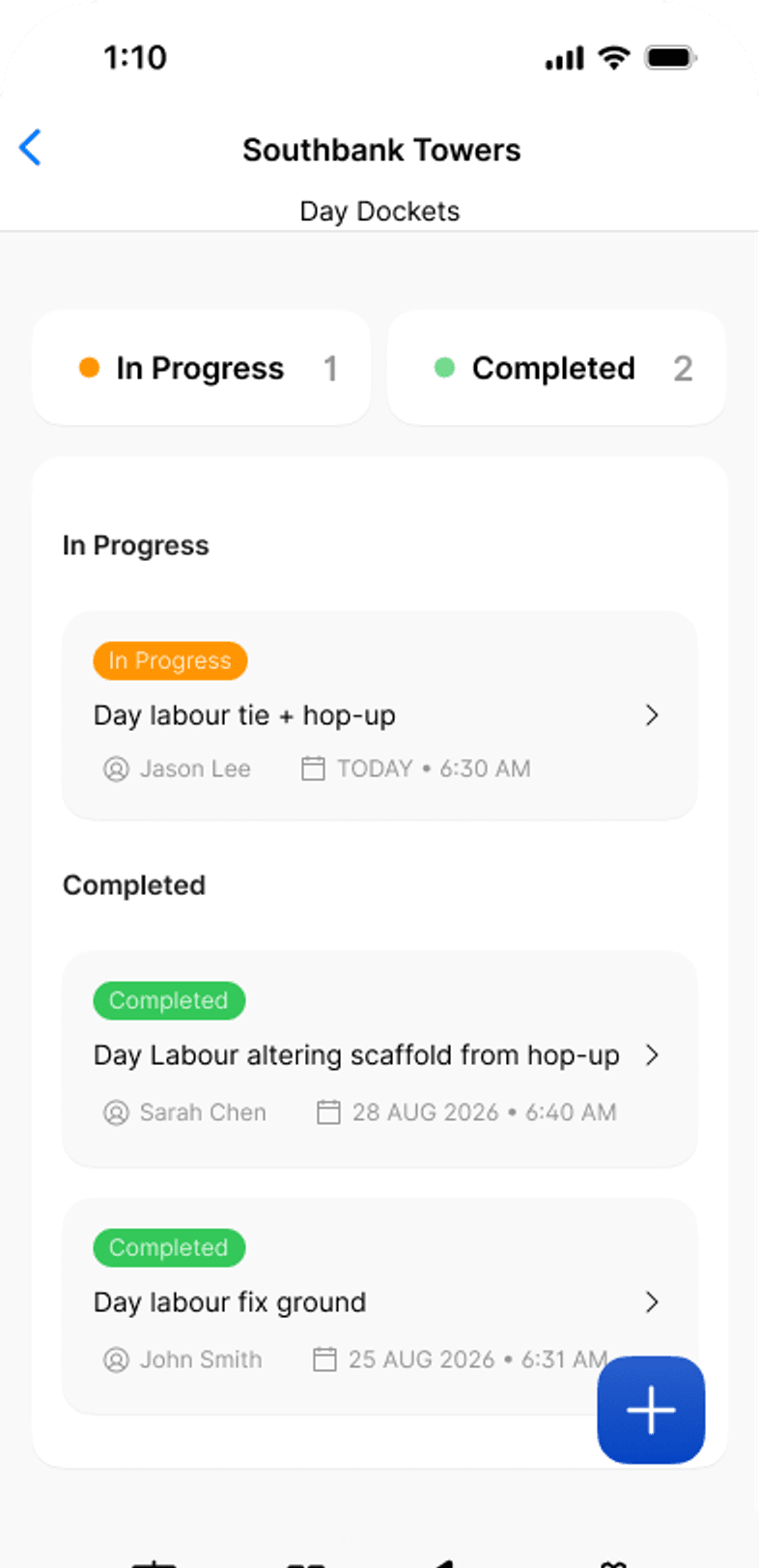

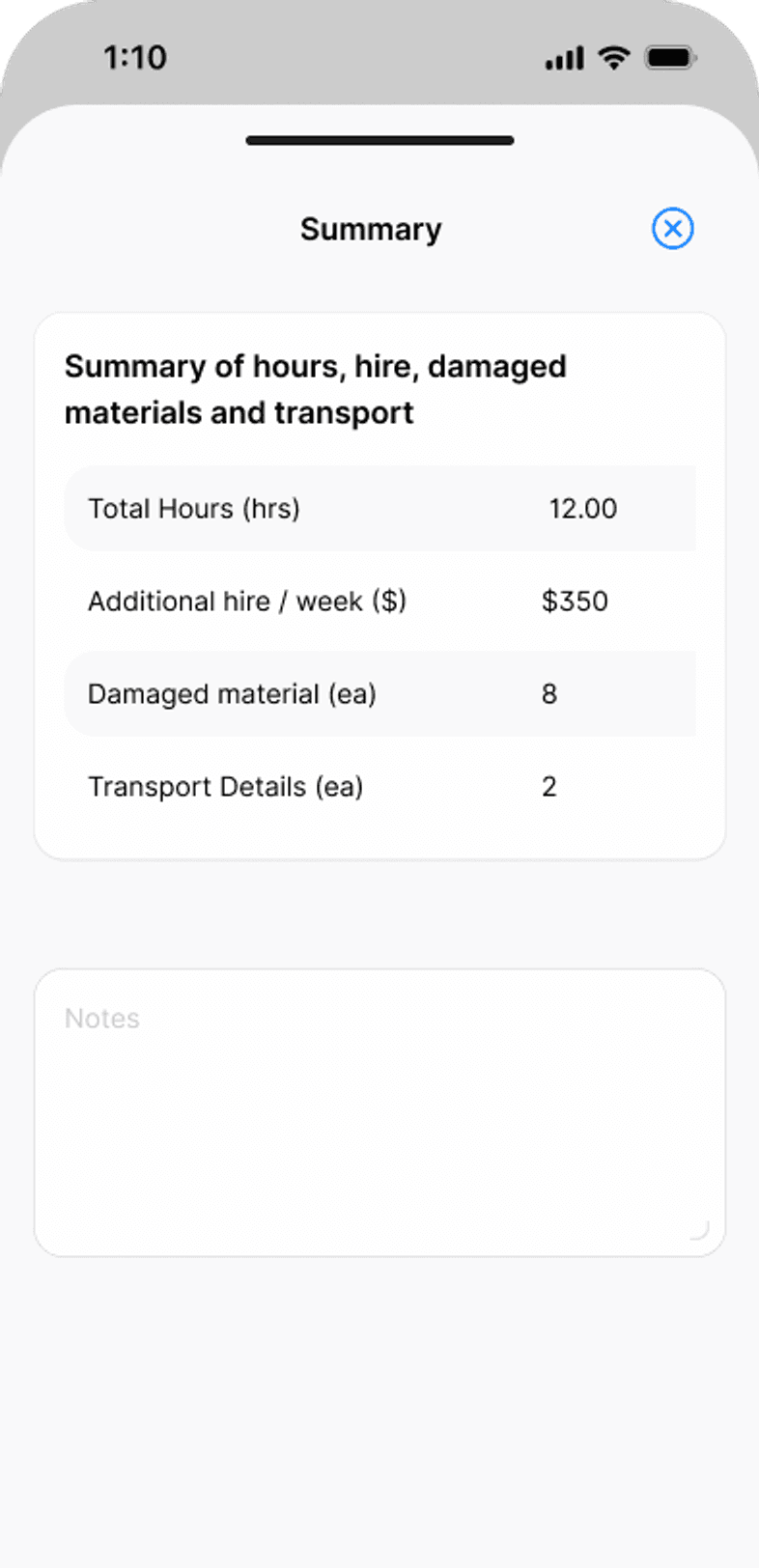
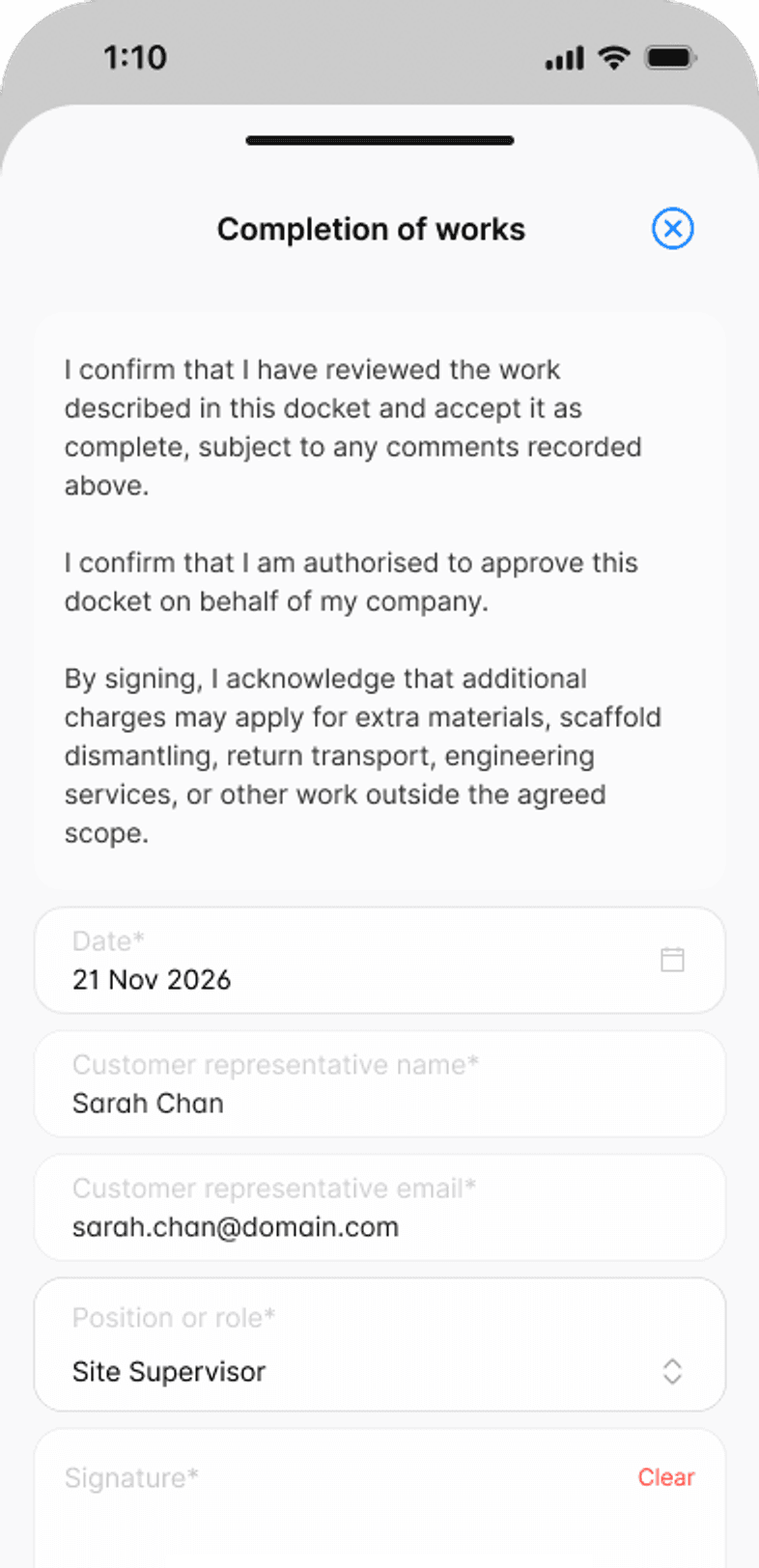
Key capabilities
Variation work,
signed before you leave
- Recorded on siteEach piece of work, who asked for it, the crew and the hours, with a photo.
- Signed on the phoneYour representative and the customer’s representative sign the same docket.
- Emailed as a PDFSent to the customer’s representative and your default recipients on submit.
…and more additional features
- Labour hoursCrew size times hours per person, calculated for you.
- Instructed ByThe person who asked for the work, recorded against it.
- Extra material hireWeekly hire rate, start date and who provided the rate.
- Damaged or cut itemsItem and quantity, with the billing code from your list.
- TransportVehicle type and quantity for deliveries and pickups.
- Save as draftFinish later. Drafts stay under In Progress until submitted.
- Hop-up MovementsHop-up moves in lineal metres, calculated from the bays and lifts.
- Tie MovementsTie moves recorded tie by tie, with a signed handover.
- Your own listsWork types, damaged materials and transport, set up your way.
Features
Every variation recorded.Every docket signed.Every PDF filed.
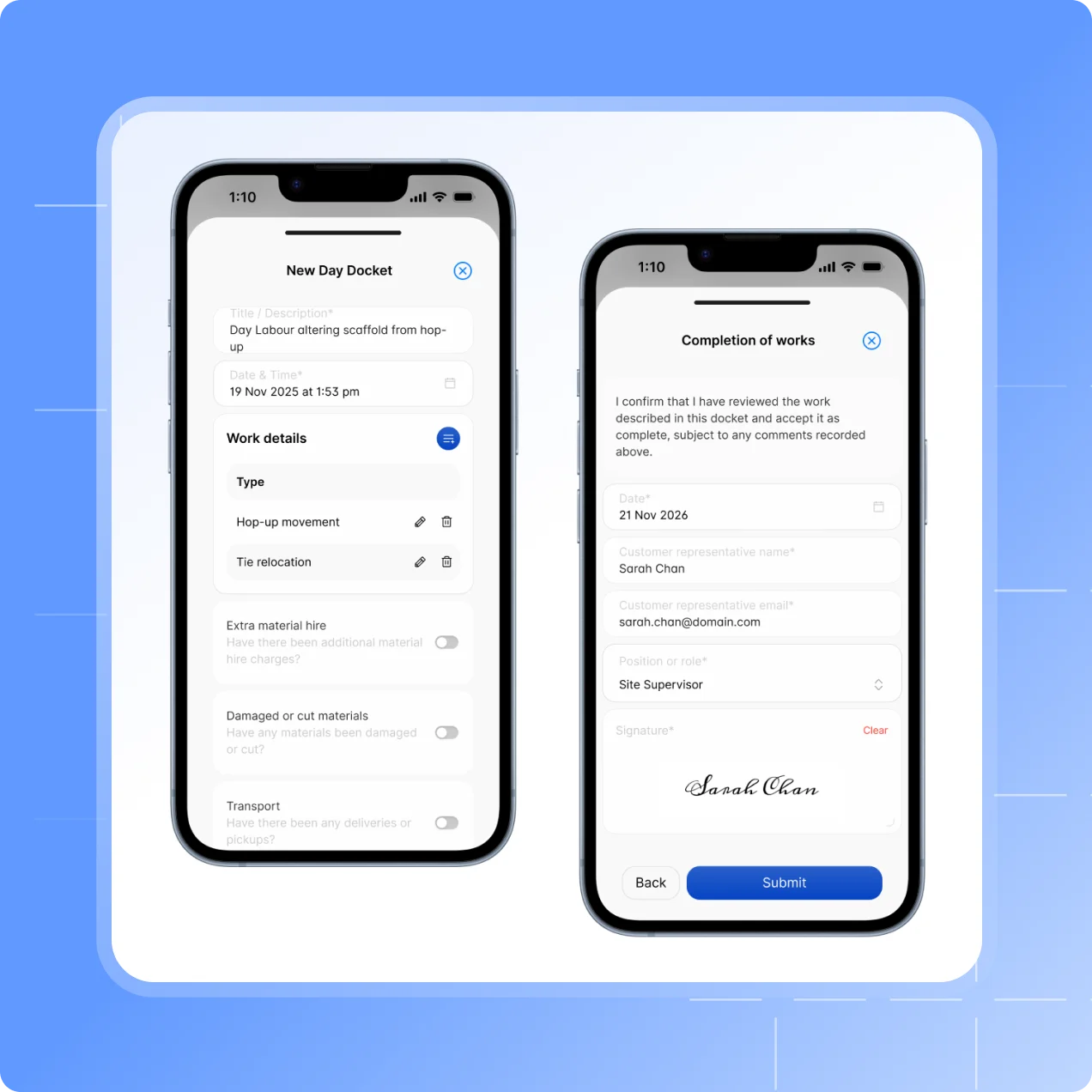
Recorded and signed on site
Signed before the crew leaves site
Add each piece of work as it’s done: the type of works, who instructed it, the crew and the hours. A summary totals it all before anyone signs.
Type of works from your own list, with building, level, elevation and related trade.
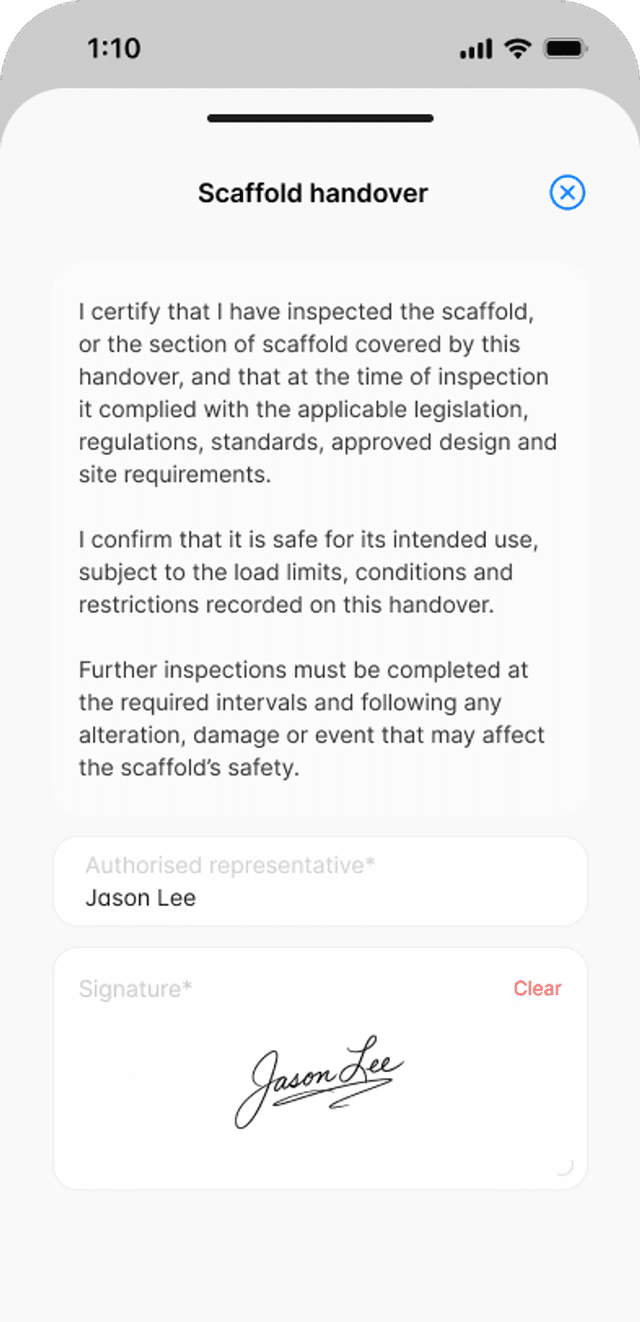
Your authorised representative signs the scaffold handover statement.
The customer’s representative signs on the same phone, confirming the work is complete and that extra charges may apply for work outside the agreed scope.
Emailed and filed
No more dockets in the ute
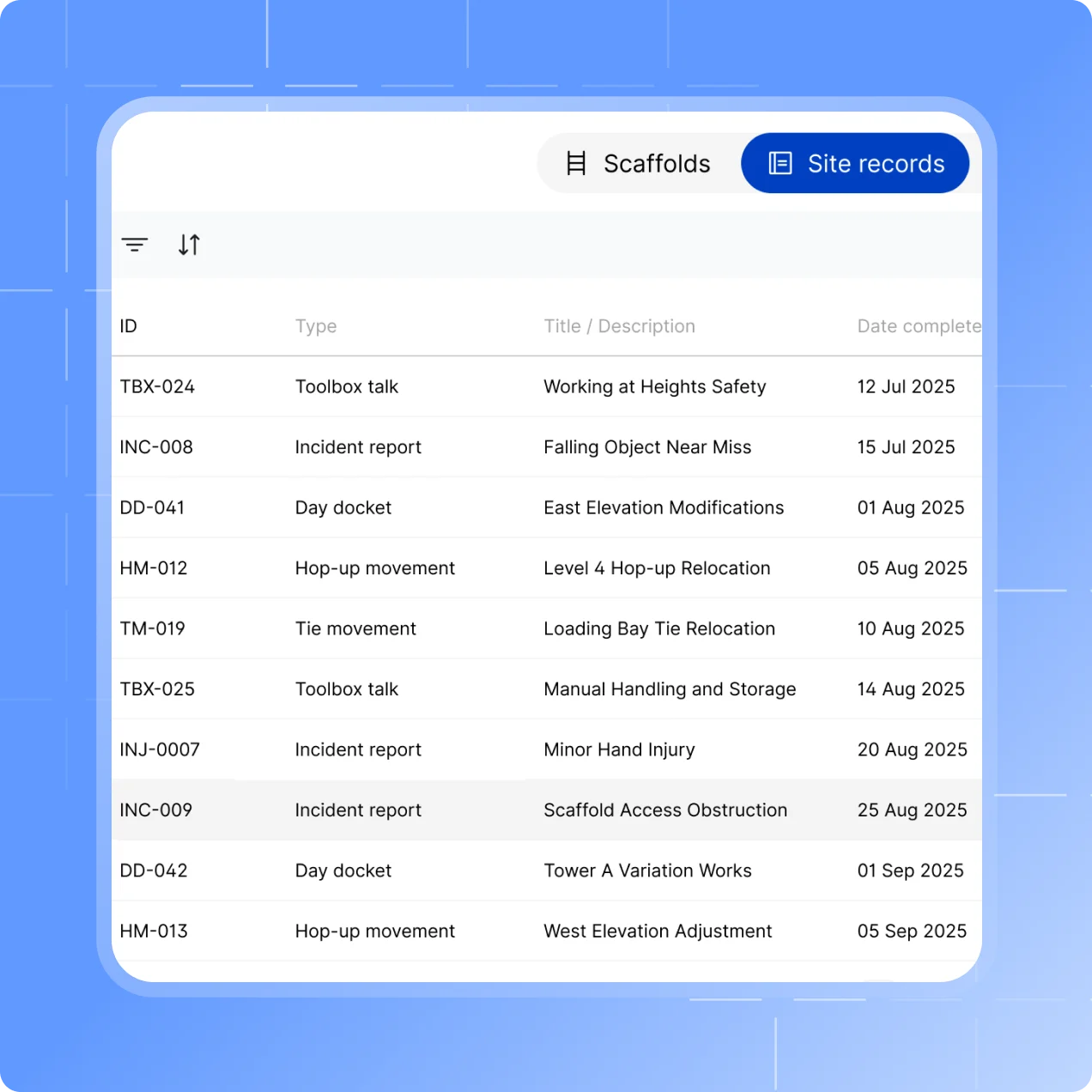
Submit the docket and Scafflinq generates the PDF and emails it straight away.
Sent to the customer representative’s email and your default recipients.
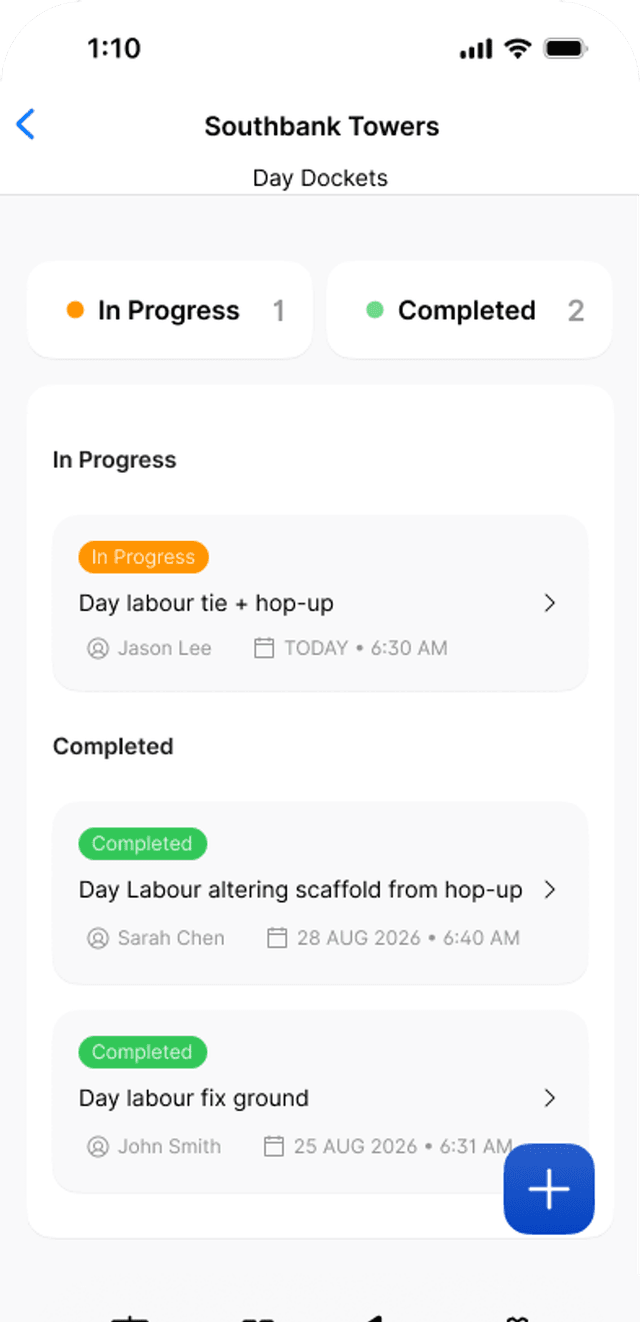
Listed in the project’s Site records tab with its own ID, date, location and submitter.
Open or resend the PDF from the web portal at any time.
Your lists
Set up the way you quote and invoice
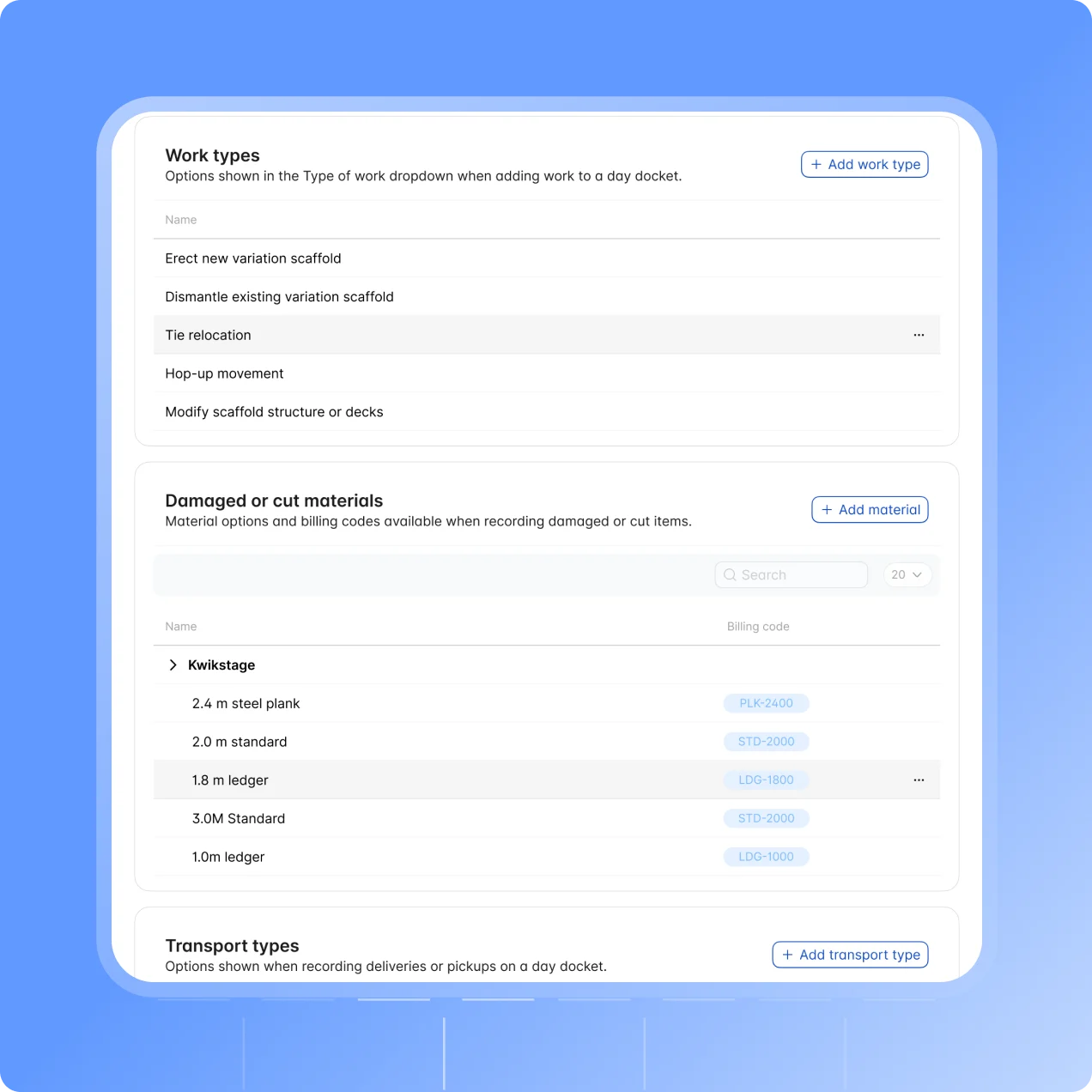
Day Dockets comes with a starter set of options, so crews can submit a docket on day one.
Edit your work types, such as hop-up movement or tie relocation.
Damaged or cut materials grouped by scaffold system, each with a billing code.
Transport types for the vehicles you use for deliveries and pickups.
Hop-ups and ties
Measured by what was moved
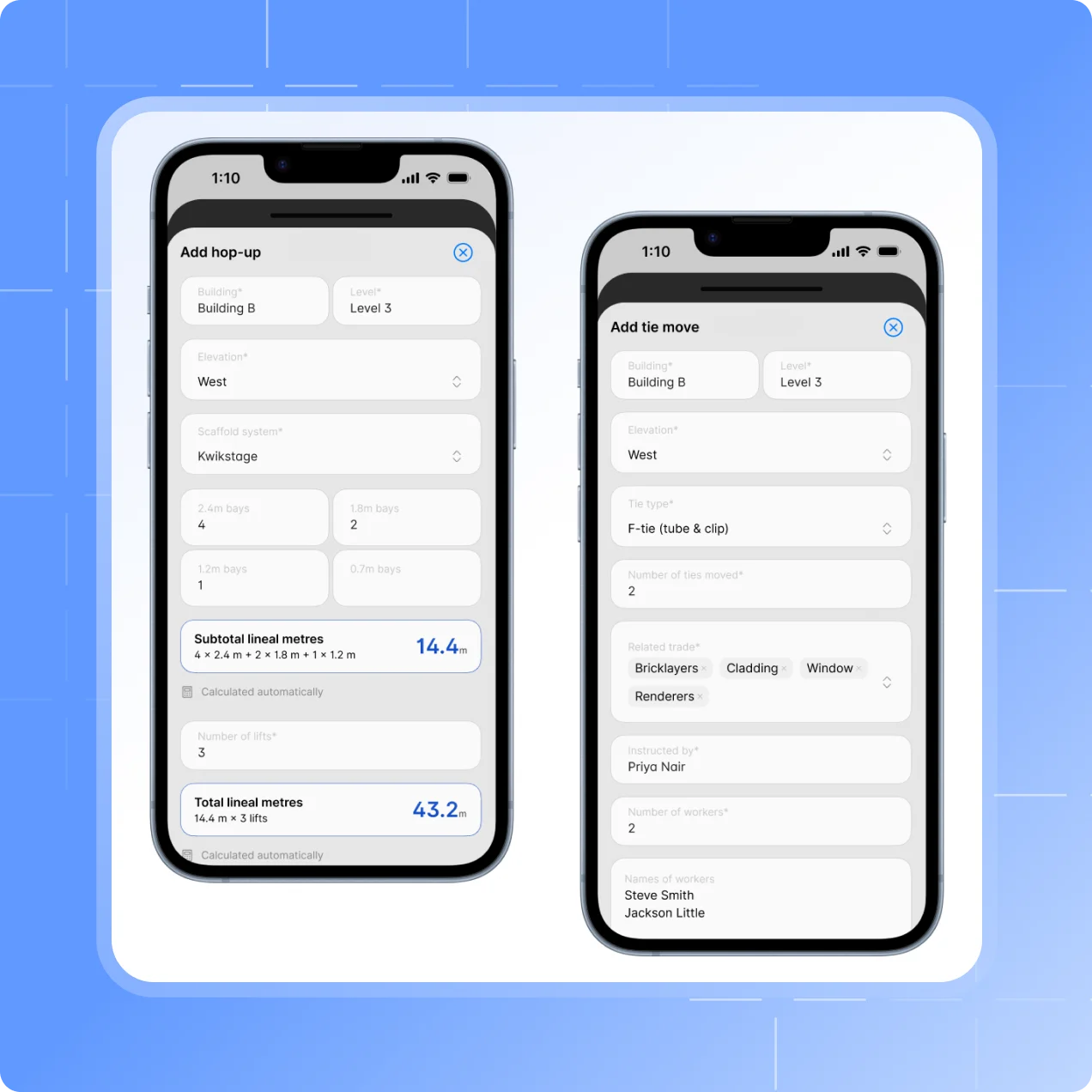
When the variation is a hop-up or tie move, record it by lineal metres or by tie, with its own handover.
Hop-up Movements calculate lineal metres from bay quantities, bay lengths and lifts.
Tie Movements record each move by tie type and the number of ties moved.
Both are signed off by your team and the client on site, and emailed as a PDF.
How it works
From variation to
signed docket
Record the work
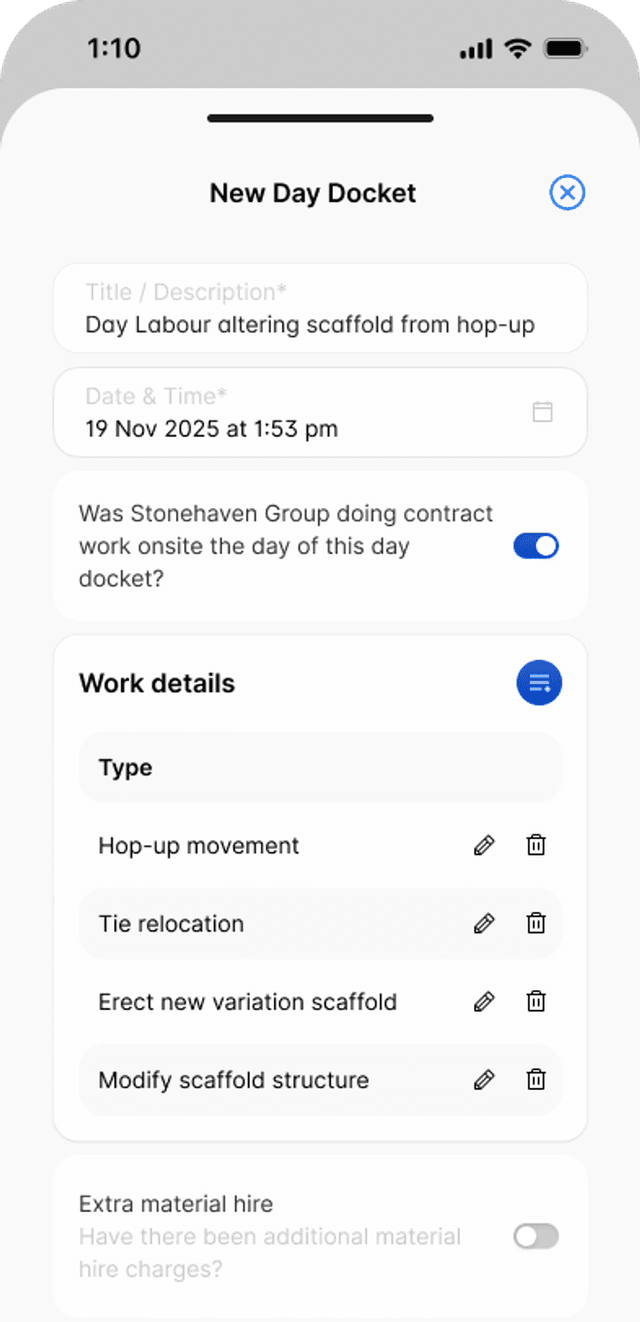
Start a day docket from the project and add each piece of work, the crew and the hours.

Sign it on site
Your representative signs the handover statement, then the customer signs on the same phone.
Emailed and filed
The signed PDF goes to the customer and your office, and stays in the project’s Site records.
Testimonials
What teams say
About Scafflinq
Vicky Amato
Australian Scaffold
Scafflinq has made our inspection and compliance processes faster, clearer, and far more efficient. It’s been a great tool for improving visibility across our projects and ensuring everything stays up to date.
Daniel Lake
Elevate Access Solutions
Scafflinq has been a game changer for our Inspections and Handovers, all our scaffolds on one platform makes it very easy to manage. Our customers love it, it makes our operation a lot more efficient.
Andres Van der Welt
Rohrig Constructions
Thanks to Scafflinq, we never have to worry about losing inspection records again. It’s always there, ready for us to access.
Shane Youssef
FC Building
Scafflinq has revolutionized the way we track scaffold inspections. It’s simple, easy to use, and gives us complete peace of mind.
Kate Paterson
Melbourne Scaffold Solutions
This innovation allows us to efficiently hand over scaffolds and keep meticulous track of inspections.
Isi Talanoa
Proview Scaffolding
Scafflinq has made scaffold handovers more efficient and helps us keep accurate, up-to-date records of every inspection.
Al Ibrahim
Buildum Construction
Scafflinq is a must-have for any builder serious about safety. It’s easy to use and gives us complete visibility into our scaffolding structures.
Mohamed Trad
Phoenix Developments
Scafflinq has made our scaffolding site safer than ever. It’s a reliable solution that we can trust.
Roi Cifti
Richard Crookes
With Scafflinq, I can access scaffold inspection history from anywhere, anytime. It’s a game-changer for our business.
Kurt Vengers
Dartanyon Developments
Scafflinq has saved us countless hours of paperwork and admin. We can now focus on our core business knowing that our scaffolding is always safe and compliant.


Vicky Amato
Australian Scaffold
Scafflinq has made our inspection and compliance processes faster, clearer, and far more efficient. It’s been a great tool for improving visibility across our projects and ensuring everything stays up to date.
Daniel Lake
Elevate Access Solutions
Scafflinq has been a game changer for our Inspections and Handovers, all our scaffolds on one platform makes it very easy to manage. Our customers love it, it makes our operation a lot more efficient.
Andres Van der Welt
Rohrig Constructions
Thanks to Scafflinq, we never have to worry about losing inspection records again. It’s always there, ready for us to access.
Shane Youssef
FC Building
Scafflinq has revolutionized the way we track scaffold inspections. It’s simple, easy to use, and gives us complete peace of mind.
Kate Paterson
Melbourne Scaffold Solutions
This innovation allows us to efficiently hand over scaffolds and keep meticulous track of inspections.
Vicky Amato
Australian Scaffold
Scafflinq has made our inspection and compliance processes faster, clearer, and far more efficient. It’s been a great tool for improving visibility across our projects and ensuring everything stays up to date.
Daniel Lake
Elevate Access Solutions
Scafflinq has been a game changer for our Inspections and Handovers, all our scaffolds on one platform makes it very easy to manage. Our customers love it, it makes our operation a lot more efficient.
Andres Van der Welt
Rohrig Constructions
Thanks to Scafflinq, we never have to worry about losing inspection records again. It’s always there, ready for us to access.
Shane Youssef
FC Building
Scafflinq has revolutionized the way we track scaffold inspections. It’s simple, easy to use, and gives us complete peace of mind.
Kate Paterson
Melbourne Scaffold Solutions
This innovation allows us to efficiently hand over scaffolds and keep meticulous track of inspections.
Isi Talanoa
Proview Scaffolding
Scafflinq has made scaffold handovers more efficient and helps us keep accurate, up-to-date records of every inspection.
Al Ibrahim
Buildum Construction
Scafflinq is a must-have for any builder serious about safety. It’s easy to use and gives us complete visibility into our scaffolding structures.
Mohamed Trad
Phoenix Developments
Scafflinq has made our scaffolding site safer than ever. It’s a reliable solution that we can trust.
Roi Cifti
Richard Crookes
With Scafflinq, I can access scaffold inspection history from anywhere, anytime. It’s a game-changer for our business.
Kurt Vengers
Dartanyon Developments
Scafflinq has saved us countless hours of paperwork and admin. We can now focus on our core business knowing that our scaffolding is always safe and compliant.
Isi Talanoa
Proview Scaffolding
Scafflinq has made scaffold handovers more efficient and helps us keep accurate, up-to-date records of every inspection.
Al Ibrahim
Buildum Construction
Scafflinq is a must-have for any builder serious about safety. It’s easy to use and gives us complete visibility into our scaffolding structures.
Mohamed Trad
Phoenix Developments
Scafflinq has made our scaffolding site safer than ever. It’s a reliable solution that we can trust.
Roi Cifti
Richard Crookes
With Scafflinq, I can access scaffold inspection history from anywhere, anytime. It’s a game-changer for our business.
Kurt Vengers
Dartanyon Developments
Scafflinq has saved us countless hours of paperwork and admin. We can now focus on our core business knowing that our scaffolding is always safe and compliant.
FAQs
Frequently asked questions
Quick answers about day dockets and hop-up and tie movements in Scafflinq.
A day docket records variation work: work a builder asks for outside the contract, such as moving a hop-up, relocating a tie or erecting an extra scaffold. It records who asked for the work, how many people worked on it, for how long, and what materials it used. The customer signs it, and the signed docket is what the invoice for that work rests on.
Also worth a look

Get every variation signed
Start free with 5 tags. Day dockets, hop-up and tie movements, recorded on site and signed on the phone.